NFC Contactless Payments: How Tap-to-Pay Works and What U.S. Businesses Need to Know About Security, Costs, and Setup

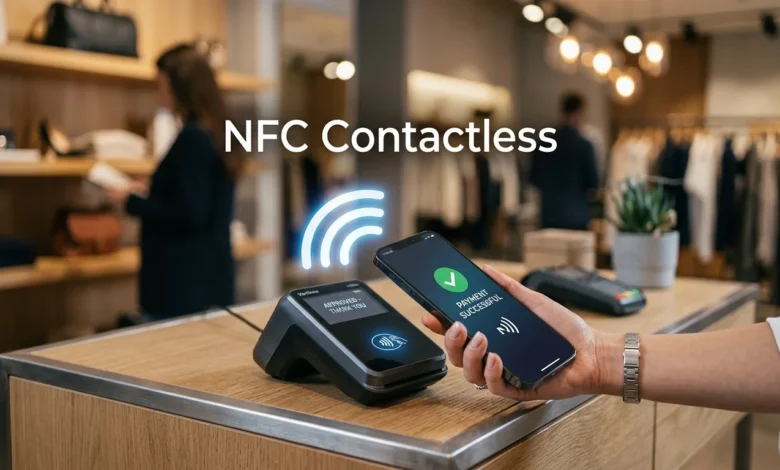
NFC contactless technology makes the familiar tap-to-pay experience possible at stores, restaurants, and other businesses. Customers can tap compatible cards, smartphones, or wearables near an enabled payment terminal. The transaction then follows the card network’s normal authorization process.
For U.S. businesses, this technology can make checkout easier while supporting payment methods customers already carry. Modern systems can accept contactless cards and popular mobile wallets through compatible hardware. Businesses still need suitable payment processing, secure equipment, and sensible staff procedures.
NFC Contactless Payments at a Glance
| Topic | Key Information |
|---|---|
| Technology | Near-field communication |
| Main use | Short-range wireless payments |
| Customer devices | Contactless cards, phones, watches, and compatible wearables |
| Merchant requirement | Compatible payment terminal or supported tap-to-phone solution |
| Typical range | Very short distance near the reader |
| Security | EMV protections, cryptography, and tokenization in supported wallet transactions |
| Common wallets | Apple Pay, Google Pay, and Samsung Wallet |
| Best suited for | Retail, restaurants, services, events, transit, and mobile businesses |
Quick answer: NFC is the short-range wireless technology commonly used for tap-to-pay transactions. A customer holds a compatible card, phone, or wearable near an enabled reader. The payment system authorizes the transaction. Modern contactless standards also include security controls designed to protect transaction data.
Key Takeaways
- NFC means near-field communication.
- Tap-to-pay cards and mobile wallets can use the same compatible terminal.
- Customers usually hold their payment method close to the reader.
- Digital wallets can use payment tokens instead of exposing the original card number.
- Merchants need compatible hardware, processing support, and proper security practices.
- Contactless acceptance can suit both fixed checkout counters and mobile sellers.
What Does NFC Contactless Mean?
Near-field communication is a wireless technology designed for short-distance communication. The NFC Forum identifies it as the technology behind common tap-to-pay experiences. Its short operating distance makes deliberate proximity an important part of the interaction.
“Contactless” describes the payment experience rather than one specific consumer device. A shopper might tap a plastic bank card, smartphone, smartwatch, or another supported wearable. The merchant receives the transaction through compatible payment equipment.
This distinction matters because near-field communication has uses beyond payments. The technology can also support access credentials, digital keys, tickets, and other tap-based interactions. Contactless payment is therefore one practical application of a broader wireless standard.
How NFC Contactless Payments Work
A tap may appear instant, but several systems participate behind the scenes. The card or device first communicates with the merchant’s compatible reader. The payment request then travels through processing and financial networks for authorization.
The basic payment process looks like this:
- The merchant prepares the transaction on the checkout system.
- The customer chooses a contactless card, phone, watch, or supported wearable.
- The customer places the payment method close to the contactless reader.
- The device and reader exchange the required payment information.
- The transaction travels through the merchant’s payment processor.
- The issuing bank or relevant provider approves or declines the request.
- The terminal displays the transaction result.
Customers don’t need to understand these stages during checkout. They usually see a prompt asking them to tap their payment method. Confirmation commonly appears on the terminal after authorization finishes.
Contactless Cards Versus Mobile Wallets
Contactless cards and mobile wallets create a similar checkout experience for customers. Both can communicate with compatible payment terminals using short-range technology. Their security and authentication methods can differ behind that familiar tap.
| Feature | Contactless Card | Mobile Wallet |
|---|---|---|
| Payment device | Physical bank card | Phone or wearable |
| Checkout action | Tap card | Tap device |
| Device authentication | Depends on transaction and issuer rules | Often passcode or biometrics |
| Tokenization | Depends on payment implementation | Commonly used for wallet payments |
| Extra hardware for merchant | Compatible reader | Usually the same compatible reader |
| Customer setup | Enabled card | Supported wallet and eligible payment card |
Mobile wallets can add device-level authentication before payment. Depending on the device, that may include a passcode, fingerprint, or facial authentication. Apple also uses secure hardware and software components for supported contactless transactions on its devices.
A contactless bank card does not require a smartphone. That makes card acceptance important even when mobile wallet use grows. Supporting both methods gives customers more freedom at checkout.
Are Tap-to-Pay Transactions Secure?
Contactless payment standards include protections designed specifically for card transactions. EMVCo states that each EMV contactless transaction generates a one-time security code. That code helps protect the transaction against certain forms of payment fraud.
Payment tokenization can add another layer of protection, particularly with digital wallets. EMVCo explains that tokenization replaces a primary account number with an alternative payment value. The token can also be restricted to a particular device, merchant, or payment scenario.
Short communication distance provides another practical safeguard. The customer must place the payment method close to the compatible reader. Still, merchants should never treat proximity alone as their complete security strategy.
Businesses should keep payment equipment and software current. They should also follow processor requirements and applicable payment-card security standards. Staff should know how to recognize suspicious terminal behavior or unexpected payment prompts.
Why U.S. Businesses Accept Tap-to-Pay

Speed is one practical reason businesses add contactless acceptance. Customers don’t need to insert a card and wait to remove it. A shorter payment interaction can help busy counters move customers through checkout efficiently.
Choice matters too. One compatible terminal may support contactless cards alongside supported phone and wearable wallets. Customers can then choose the payment method they already prefer.
The technology can also help businesses reduce dependence on physical cash handling. Electronic transactions create payment records that can support reconciliation and bookkeeping. Owners still need to compare processing costs and settlement terms before choosing a provider.
Businesses considering new payment technology should connect the purchase with broader financial priorities. BusinessVert’s guidance on aligning finances with business goals can help owners evaluate technology spending. The same approach applies when comparing terminal upgrades, monthly fees, and transaction charges.
What Equipment Does a Business Need?
Start with a payment system that supports contactless acceptance. Many newer card terminals already include the necessary functionality. Older equipment may require replacement or a separate compatible reader.
Some payment providers also support accepting taps directly on eligible smartphones. Mastercard describes Tap on Phone as a method for merchants to accept contactless transactions on supported NFC-enabled devices. Availability, hardware requirements, and pricing depend on the provider.
Before changing equipment, ask your processor several specific questions:
- Does my current terminal already support tap-to-pay?
- Which contactless cards and mobile wallets can I accept?
- Do I need different processing rates or account settings?
- Can an eligible smartphone work as an acceptance device?
- What security and compliance requirements apply?
- Will the system integrate with my current point-of-sale software?
- How quickly will transactions settle into my business account?
Technology should solve an operating problem, not create another. Restaurants and retailers should consider transaction volume, queue length, staff training, and existing software. BusinessVert’s discussion of technology in fast-food franchises shows how digital tools can fit broader customer-service operations.
NFC Versus Other Payment Methods
Tap-to-pay is not the only way customers can complete digital transactions. Chip cards, QR codes, cash, and online payment links still have useful roles. The right combination depends on where and how a business sells.
| Method | Customer Action | Physical Contact | Common Business Use |
|---|---|---|---|
| Tap-to-pay | Hold card or device near reader | No insertion required | In-person checkout |
| EMV chip | Insert card into terminal | Yes | In-person checkout |
| QR payment | Scan or present code | No | Counters, tables, and events |
| Online payment link | Open link and complete checkout | No | Remote sales and invoices |
| Cash | Hand currency to merchant | Yes | In-person transactions |
A retailer with a fixed checkout counter may value a full payment terminal. A contractor or mobile seller may prefer portable acceptance options. A restaurant might combine terminal payments with online ordering and other digital customer tools.
The goal is not to replace every existing payment method. Businesses benefit from giving customers suitable choices without making operations unnecessarily complicated. The payment mix should fit transaction volume, customer behavior, costs, and security requirements.
How to Start Accepting Contactless Payments
First, check whether your current terminal displays the contactless payment symbol. Do not assume an older reader supports every current payment method. Your processor can confirm supported cards, wallets, and required software settings.
Next, compare the total cost of enabling or upgrading the service. Review hardware charges, processing rates, monthly fees, contracts, and integration expenses. Compare those costs with expected transaction volume and operational benefits.
Then test the checkout process before promoting it to customers. Employees should know where customers need to tap and how successful payments appear. Staff should also understand what to do when a transaction fails.
Finally, make contactless acceptance visible at checkout. Clear signage can tell customers they can tap instead of asking a cashier. Monitor transaction issues after launch and keep the terminal software updated.
Common NFC Payment Problems
A failed tap does not always indicate a serious problem. The card or device may be positioned incorrectly, or the terminal may not be ready. A customer might also have an unsupported card or wallet.
Phone payments can fail when device settings or authentication requirements aren’t met. Card issuers can also restrict whether particular cards work with mobile wallets. The customer may need another payment method when the issue cannot be resolved quickly.
Merchants should avoid repeatedly restarting the entire checkout process without identifying the problem. Staff training can provide a simple fallback sequence for failed transactions. Keeping chip and other accepted payment methods available can prevent unnecessary delays.
What Contactless Payments Mean for Small Businesses
Small companies do not need enterprise-sized checkout systems to consider tap-to-pay. The market now includes traditional terminals, compact readers, and supported phone-based acceptance options. The right choice depends on the company’s sales environment and processor.
Owners should evaluate payment technology as part of wider business operations. Costs, customer expectations, transaction speed, accounting, and security all affect the decision. BusinessVert’s small-business coverage can provide additional context for owners reviewing operational investments.
Customer experience also matters beyond the payment itself. Fast checkout cannot compensate for unclear prices, poor service, or unreliable systems. Payment technology works best when it removes friction from an already well-designed buying process.
Frequently Asked Questions
Are NFC Contactless Payments Safe?
Modern contactless payments use security controls designed for card transactions. EMV contactless transactions use dynamic transaction data, while supported digital wallets may use tokenization. Businesses still need secure terminals, current software, and proper payment procedures.
Do You Need Internet Access for NFC Payments?
The short-range communication between a card or phone and reader does not itself require internet access. However, the merchant’s payment system usually needs connectivity to obtain transaction authorization. Exact offline capabilities depend on the processor, terminal, and payment rules.
Can an iPhone or Android Phone Make Contactless Payments?
Compatible smartphones can make tap-to-pay transactions when the required wallet and payment card are supported. Availability can depend on the phone, operating system, bank, card, and region. Customers should check their wallet provider and card issuer for compatibility.
Can a Business Accept Contactless Payments With a Phone?
Some providers let eligible merchants accept contactless transactions using compatible smartphones. Mastercard, for example, supports Tap on Phone solutions through participating payment providers. Merchants should confirm device support, fees, security requirements, and processor availability before relying on this setup.
Is NFC the Same as Contactless Payment?
Not exactly. Near-field communication is the short-range wireless technology behind many contactless interactions. Contactless payment describes the payment experience created when compatible devices and payment systems use that technology.
Is Tap-to-Pay Worth Adding to Your Business?
For many customer-facing businesses, accepting taps is a practical extension of existing card acceptance. It supports contactless cards, phones, and compatible wearables without requiring separate checkout processes. The strongest case exists when customers already request these payment methods.
Start by checking your existing terminal before buying new equipment. Then compare processor support, fees, security requirements, and integration needs. Choose the setup that improves checkout without adding unnecessary operating complexity.