Healthcare Payment Processing: A Practical Guide for U.S. Medical Practices

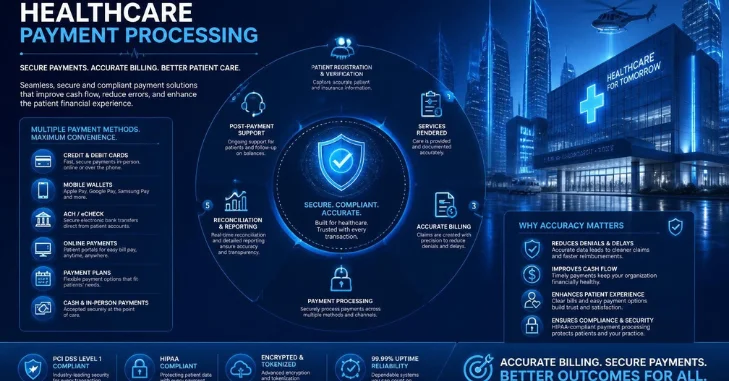
Healthcare payment processing helps medical practices collect patient balances through secure electronic payment channels. The right system can support cards, online payments, digital wallets, and recurring payment arrangements. It should also fit the practice’s billing, security, and compliance responsibilities.
For U.S. providers, choosing a processor involves more than comparing transaction rates. Practices must consider PCI DSS requirements, patient data, integrations, reporting, and payment convenience. A good setup makes collections easier without creating unnecessary administrative work.
Direct answer: Healthcare payment processing is the system that lets medical providers securely accept and manage patient payments. It can cover in-office cards, online portals, payment links, stored payment methods, and recurring plans. U.S. practices should evaluate security, PCI DSS responsibilities, HIPAA implications, integrations, pricing, reporting, and patient convenience before choosing a provider.
Healthcare Payments at a Glance
| Area | What U.S. Practices Should Consider |
| Payment channels | In-person, online, mobile, phone, and payment links |
| Common methods | Credit cards, debit cards, digital wallets, and eligible HSA/FSA cards |
| Card security | PCI DSS requirements apply to payment-card environments |
| Health information | HIPAA may apply when systems handle protected health information |
| Integrations | EHR, practice management, billing, and accounting systems |
| Patient experience | Clear bills, convenient methods, receipts, and payment plans |
| Pricing | Transaction rates, monthly fees, hardware, gateway costs, and other charges |
| Reporting | Reconciliation, refunds, chargebacks, deposits, and transaction records |
Key Takeaways
- Medical payment systems need to balance security, compliance, cost, and patient convenience.
- PCI DSS and HIPAA address different risks and should not be treated as interchangeable requirements.
- Processing costs should be evaluated as a complete pricing structure rather than one advertised percentage.
- EHR and practice-management integrations can reduce manual reconciliation and billing work.
- Multiple payment channels can make outstanding balances easier for patients to address.
- Practices should define data responsibilities before signing with a processor.
What Is Healthcare Payment Processing?
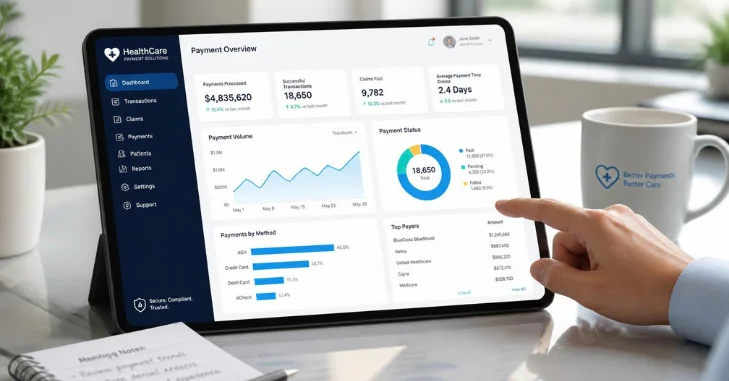
Healthcare payment processing covers the technology and financial services used to collect patient payments. It can connect a card terminal, payment gateway, merchant account, billing system, and practice software. The exact setup varies between small clinics, dental offices, specialists, and larger provider groups.
A typical transaction begins when a patient submits a payment. The processor routes the transaction through the relevant financial networks for authorization. After approval and settlement, the processor deposits funds according to the provider’s agreement.
Healthcare billing adds considerations that ordinary retail transactions may not involve. A payment can relate to a copay, deductible, self-pay service, or outstanding balance. Practices therefore need payment tools that fit their billing processes, not isolated checkout systems.
How the Patient Payment Process Works
The process often starts once insurance and patient responsibility become clear. A patient may pay at registration, after receiving care, or after receiving a statement. The practice then records that payment against the appropriate account.
Electronic payments pass through several systems before settlement. The payment gateway securely transmits transaction information, while processors and financial institutions handle authorization and fund movement. The practice’s software may then reconcile the completed payment with the patient account.
That last connection can matter greatly for administrative teams. Manual entry creates more opportunities for mismatched balances and time-consuming reconciliation. Integrated workflows can reduce duplicate work when configured correctly.
Business owners reviewing broader operational changes can also use BusinessVert’s business consulting guide. Its vendor-selection framework is useful when comparing technology providers and implementation support.
HIPAA and PCI DSS Are Not the Same Thing
HIPAA regulates covered entities and certain business associates handling protected health information. HHS states that covered providers include healthcare providers conducting specified electronic financial and administrative transactions. HIPAA also permits appropriate uses and disclosures of protected information for payment activities.
A payment processor is not automatically a HIPAA business associate in every transaction. HHS explains that financial institutions performing ordinary consumer payment-card and funds-transfer activities are not business associates merely because they facilitate payment. The relationship can change when a vendor performs additional services involving protected health information.
PCI DSS focuses on payment-card account data rather than medical information. The PCI Security Standards Council says the standard applies to entities storing, processing, or transmitting cardholder data. Outsourcing processing can reduce a merchant’s direct scope, but it does not eliminate every merchant responsibility.
Practices should therefore ask separate questions about each framework. They should identify where card data travels and whether protected health information enters connected services. Legal or compliance professionals can help resolve situations where responsibilities are unclear.
Payment Methods Patients May Expect
In-person card acceptance remains useful for copays and balances collected at the front desk. Online portals and payment links can help patients pay after leaving the office. Mobile-friendly checkout also matters because many patients receive bills or reminders on their phones.
Digital wallets can provide another convenient option when the processor supports them. Eligible HSA and FSA cards may also be relevant for qualifying healthcare expenses. Available methods depend on the processor, merchant setup, and transaction type.
Payment plans can be especially useful when patients face larger balances. CMS advises patients who cannot afford a bill to ask providers about payment plans or possible reductions. Offering clear arrangements can give patients a defined path for handling eligible balances.
For organizations focused on patient relationships, BusinessVert’s article on how animal hospitals build long-term client relationships offers related service principles. Clear communication around charges and payment options supports the same trust-building goal.
What Does Medical Payment Processing Cost?
There is no single processing price that applies to every U.S. medical practice. Costs can vary by provider, payment method, card type, transaction volume, hardware, and contractual terms. Comparing only the headline percentage can therefore produce a misleading result.
A proposal may contain transaction fees, monthly charges, gateway costs, equipment expenses, or other account fees. Practices should request a complete fee schedule before signing. They should also clarify refund, chargeback, cancellation, and contract terms.
The best comparison uses the practice’s own transaction profile. Estimate expected monthly card volume, average transaction size, and payment channels. Then calculate the likely total cost under each proposal instead of comparing one rate.
Features Worth Comparing Before Choosing a Provider
Security controls should be one of the first review areas. Ask how the provider protects card data and whether tokenization is available for stored payment methods. Confirm the provider’s current PCI DSS status for the services being considered.
Integration is another major factor. A processor that connects with existing EHR, practice-management, or billing software may reduce manual posting. The practice should test how payments, refunds, deposits, and adjustments appear across those systems.
Reporting deserves equal attention because finance teams need accurate reconciliation. Useful systems should make transaction histories, deposit records, refunds, and chargebacks easy to locate. Permissions should also limit sensitive functions to appropriate employees.
Patient-facing features can affect adoption. Look for mobile-friendly payment pages, clear receipts, multiple payment methods, and accessible support. Avoid adding technology that makes a simple bill harder for patients to understand.
A Practical Provider Comparison Checklist
| Question | Why It Matters |
| What is the complete pricing structure? | Reveals costs beyond the advertised transaction rate |
| Which payment methods are supported? | Determines how patients can pay |
| What PCI DSS responsibilities remain with us? | Clarifies the practice’s card-security obligations |
| Does the service handle PHI? | Helps determine possible HIPAA implications |
| Will the vendor sign a BAA when required? | Addresses applicable business-associate responsibilities |
| Does it integrate with current software? | Can reduce duplicate data entry |
| How are refunds and chargebacks handled? | Affects staff workload and financial controls |
| How quickly are funds deposited? | Helps with cash-flow planning |
| What reporting tools are included? | Supports reconciliation and auditing |
| What support is available? | Matters when payments fail or systems go offline |
Do not treat a checklist response as sufficient proof by itself. Ask vendors to document security, contractual responsibilities, pricing, and service terms. Your internal technology and compliance teams should review important integrations before deployment.
Smaller providers may also benefit from BusinessVert’s broader small-business resources. Those articles cover operational and financial topics that can complement payment-system planning.
Common Mistakes Practices Should Avoid
Choosing on price alone is a frequent mistake. A lower advertised rate may matter less if the system creates manual work or carries extra charges. Compare total operating cost and workflow impact together.
Another mistake is assuming that a processor’s compliance statement transfers all responsibility away from the practice. PCI SSC states that merchants retain responsibilities even when payment functions are outsourced. Practices should document shared responsibilities instead of relying on a marketing badge.
Teams should also avoid sending unnecessary health information through payment fields. Payment systems should receive only information required for their intended function. Keeping systems and data flows clearly separated can simplify risk management.
Patient Billing Transparency Matters Too
Payment technology cannot repair a confusing bill. Patients need to understand what they owe, what the charge represents, and where they can ask questions. CMS advises patients to review bills for accuracy and contact providers when charges are unclear.
Rules surrounding estimates can also affect billing workflows. Under federal No Surprises Act requirements, uninsured or self-pay patients generally receive good faith estimates in covered situations. According to CMS, a federal dispute process can apply when an eligible bill is at least $400 above the expected charges.
Practices should coordinate payment tools with billing policies and patient communications. The checkout experience is only one part of the collection process. Clear information before and after care can prevent avoidable billing confusion.
How to Choose a Payment Setup for Your Practice
Start by mapping how patients currently pay and where staff spend time correcting payment records. Identify the systems that must exchange information. This creates a practical requirements list before vendor demonstrations begin.
Next, compare several providers using the same questions. Request complete pricing, security documentation, integration details, settlement information, and support terms. Testing the workflow with realistic scenarios can reveal problems that sales demonstrations miss.
Finally, assign internal ownership for implementation and ongoing reviews. Someone should monitor processor performance, security obligations, fees, and staff access. Revisit the arrangement when payment volume, software, or practice needs change.
Build the Payment Process Around Patients and Operations
A strong payment system should make collecting legitimate patient balances simpler for both sides. It should fit existing billing operations while protecting card data and supporting applicable privacy requirements. Convenience matters, but security and clear responsibilities matter equally.
Before changing providers, document your current payment channels and administrative problems. Compare vendors using the same requirements and complete cost assumptions. Then verify compliance responsibilities before connecting the new service to clinical or billing systems.
For more U.S. business guidance, visit BusinessVert’s business coverage. Its business, finance, and small-business coverage can help organizations evaluate operational decisions beyond payment technology.
Frequently Asked Questions
Is healthcare payment processing required to be HIPAA compliant?
HIPAA applicability depends on the organization, service, and information involved. Ordinary payment-card processing does not automatically make a financial institution a business associate. Services that create, receive, maintain, or transmit PHI on a covered entity’s behalf may create additional HIPAA obligations.
Does using a third-party processor remove PCI DSS responsibilities?
No. PCI SSC states that outsourcing all payment processing does not remove every merchant responsibility. Merchants should verify provider compliance and understand their own validation and shared-responsibility requirements.
Can a medical practice offer patients payment plans?
Practices may offer payment arrangements subject to their policies and applicable requirements. CMS specifically advises patients struggling with medical bills to ask providers whether payment plans are available. Terms should be explained clearly before patients agree.
Should a practice store patient card details?
Practices should avoid unnecessary exposure to raw card data. Tokenized stored-payment methods can reduce the need for systems to retain card details directly. The processor should explain the security model and the practice’s remaining PCI DSS responsibilities.
What should a practice ask a payment processor before signing?
Ask about complete pricing, PCI DSS status, security controls, integrations, settlement timing, chargebacks, refunds, support, and contract terms. Also determine whether the service will handle protected health information. If it does, clarify the vendor’s HIPAA role and whether a business associate agreement is required.