A digital phone converts voice into digital information instead of carrying sound as a continuous analog signal. Modern business systems may use office PBX technology, internet connections, or cloud-based Voice over Internet Protocol services. For U.S. companies, that can mean more calling features, easier expansion, and better support for remote teams.
The term can be confusing because several technologies fit under the same label. A traditional digital PBX handset and a cloud VoIP phone both process calls digitally. However, their connections, hardware requirements, management methods, and flexibility can differ considerably.
Digital Phone Technology at a Glance
| Topic | What to Know |
|---|---|
| Basic function | Converts voice into digital data |
| Common business forms | Digital PBX phones, IP phones, VoIP services, softphones |
| Connection | Proprietary PBX wiring, Ethernet, Wi-Fi, or broadband |
| Main advantages | Call management, mobility, scalability, integrations |
| Main limitations | May depend on power, networks, compatible equipment, or internet |
| Best suited for | Offices, customer-facing teams, remote staff, growing companies |
| Common alternatives | Analog landlines, mobile-only service |
| U.S. consideration | Check 911, number portability, security, and backup requirements |
Direct answer: A digital telephone converts speech into digital data before transmitting the call. Business versions can operate through a local PBX or an internet-based VoIP service. They often support routing, voicemail, conferencing, extensions, and remote access. The right setup depends on connectivity, staff locations, reliability needs, and existing equipment.
What Is a Digital Phone?

A digital phone changes spoken audio into encoded data for transmission. Traditional analog service instead represents speech through continuously changing electrical signals. This digital approach allows phone systems to handle information and features beyond basic voice calling.
The phrase does not identify one single type of product. Some office handsets connect directly to a proprietary digital PBX installed inside the building. Others are IP phones that communicate through a local data network and an internet-based calling service.
Cloud services add another option for businesses that do not want traditional desk hardware. Employees can use software-based phones on computers or mobile devices instead. A VoIP number is not tied to one physical copper line, which supports location flexibility.
How Does a Digital Phone Work?
The process starts when a microphone captures your voice during a call. The system converts that audio into digital information using electronic processing. The receiving system then reconstructs the information so the other person hears your voice.
A traditional digital PBX may keep much of this process inside dedicated office telephone equipment. An IP-based system places the voice information into data packets for network transmission. Those packets can travel through a company network and then across an internet connection.
For users, most of this technology stays invisible during normal calling. Employees still dial numbers, answer calls, transfer customers, and check voicemail. The major difference appears in how the system connects those calls and manages extra features.
Digital vs. Analog vs. VoIP Phones
These terms overlap, but they should not be treated as exact synonyms. Analog phones use traditional electrical voice signals, while digital systems convert speech into coded information. VoIP is a specific digital method that sends voice through Internet Protocol networks.
| Feature | Analog Phone | Digital PBX Phone | VoIP/IP Phone |
|---|---|---|---|
| Voice format | Analog signal | Digital data | Digital packets |
| Typical connection | Copper phone line | Compatible PBX | Data network |
| Remote use | Limited | Usually limited | Strong |
| Advanced routing | Limited | Available | Common |
| Software integrations | Limited | Varies | Common |
| Internet required | Usually no | Not always | Usually yes |
| Expansion | Hardware dependent | PBX dependent | Often easier |
Analog equipment can remain useful for simple calling requirements. Digital PBX equipment may suit organizations that already own a compatible internal system. VoIP often makes more sense when teams need mobility, cloud administration, or easier expansion.
A business replacing its communications system should not compare handsets alone. Network quality, expected call volume, remote access, integrations, and support also matter. Existing wiring and equipment can affect migration costs as well.
Benefits for U.S. Businesses
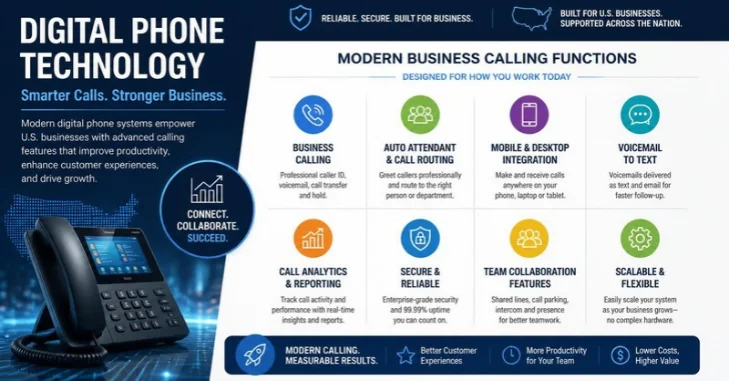
One major advantage is better call management. Digital business systems can support extensions, transfers, voicemail, conferencing, forwarding, and multiple lines. More advanced services may also add queues, auto attendants, analytics, recording, or software integrations.
Mobility can be another strong benefit for distributed companies. Internet-based numbers can work across compatible connected devices instead of one fixed physical line. That makes them useful for hybrid employees, traveling staff, and businesses with several locations.
Expansion can also become easier when the service uses cloud administration. A company may add users without installing another traditional telephone circuit for every employee. The exact process still depends on the provider and selected service.
Reliable connectivity remains important for internet-based calling. BusinessVert’s guide to T-Mobile Business Internet discusses another connectivity option for U.S. companies. Companies should evaluate speed, stability, coverage, and backup service before depending heavily on internet calling.
Possible Drawbacks and Reliability Issues
Internet-based calling creates dependencies that a traditional powered copper line may not share. A local power failure, router problem, or broadband outage can interrupt service without backup systems. Companies handling important customer calls should plan for those interruptions.
That preparation can include backup internet, uninterruptible power, mobile forwarding, or another recovery method. Emergency calling requirements also deserve attention during setup. Businesses should confirm how their provider handles location information and 911 service for each user.
Security is another part of the decision. Network-connected phones and administrative accounts require sensible access controls and maintained software. CISA recommends multifactor authentication for business accounts and warns that network devices can create risks when default credentials remain unchanged.
What Equipment Does a Business Need?
Required equipment depends on the system you choose. A cloud setup may need only a reliable internet connection, compatible computers, headsets, and software. Companies wanting traditional desk handsets can use compatible IP phones instead.
An existing PBX environment may require specific proprietary handsets or interface equipment. Digital PBX phones are often designed for particular systems rather than universal connections. Businesses replacing one handset should therefore confirm model and system compatibility before purchasing hardware.
Internet-based systems also depend on suitable networking equipment. Routers, switches, Wi-Fi coverage, bandwidth, and network configuration can affect call performance. Larger offices should have their IT provider assess expected traffic before deployment.
What Features Should You Look For?
Start with the features your employees and customers will use each week. Extra functions add little value when they do not solve an operational problem. Your shortlist should connect each feature to a specific communication need.
Useful business features can include:
- Auto attendant and menu routing
- Call queues and ring groups
- Call forwarding
- Voicemail and voicemail-to-email
- Desktop and mobile applications
- Conference calling
- Business text messaging
- Call recording where legally appropriate
- Reporting and call analytics
- CRM or help-desk integrations
- Central user administration
- Number porting support
Solo owners may need far fewer capabilities than a customer-support department. BusinessVert’s free business phone number guide explains options for owners starting with a separate company number. Growing teams should focus more heavily on routing, shared access, support, and administration.
How Much Does a Digital Business Phone System Cost?
There is no single standard price for business calling services. Costs can depend on users, handsets, calling plans, toll-free service, integrations, support, and optional features. On-premises systems can also involve installation and maintenance expenses.
Cloud services commonly change the cost structure by replacing some local infrastructure with recurring service charges. That can reduce hardware requirements, but it does not automatically make every deployment cheaper. Businesses should compare the complete cost across their expected ownership period.
Ask prospective providers for a written breakdown before signing an agreement. Include hardware, activation, number porting, taxes, support, optional features, and contract terms. Comparing the same requirements across vendors produces a more useful price comparison.
How to Choose the Right System for Your Business
Begin with how calls move through your company today. Count users, locations, important numbers, peak call volumes, and remote workers. Then identify problems such as missed calls, difficult transfers, limited reporting, or personal numbers used for work.
Next, check the infrastructure that will support the new service. Internet-based systems need stable connectivity and an outage plan. Existing office hardware may also affect whether migration should happen at once or in stages.
Finally, test the provider’s daily workflow before committing. Ask staff to try transfers, voicemail, mobile access, and other high-use functions. A system should make common communication tasks simpler rather than adding unnecessary complexity.
The same principle applies to older communications workflows. BusinessVert’s guide to sending a fax from an iPhone shows how internet services can replace dedicated office hardware. Phone modernization can follow a similar pattern when the business case makes sense.
Should a Small Business Switch?
A small company should consider switching when its current setup limits customer service or staff flexibility. Common warning signs include missed calls, shared personal numbers, difficult remote access, or costly system changes. Growth can expose these limitations quickly.
A cloud system can be appealing when employees work from several locations. An existing PBX may still be practical when it works reliably and meets current needs. Replacing functional equipment without a clear benefit can create unnecessary expense.
The better question is whether the system supports how your company communicates now. It should also handle expected growth without forcing another disruptive replacement soon. Compare reliability, features, support, security, and total cost before choosing.
The Bottom Line
Modern telephone systems give businesses more choices than traditional single-line service. The strongest option depends on company size, connectivity, mobility needs, existing equipment, and customer-call requirements. Choosing by business need is more useful than choosing by technology label alone.
For many U.S. businesses, an IP or cloud system offers an attractive combination of mobility and call-management features. Other organizations can still have good reasons to retain compatible PBX or analog equipment. Review the full operating environment before replacing a system that customers depend on.
Start by documenting your current lines, users, devices, and most important calling workflows. Then compare providers against that list and test the features your staff uses daily. That approach turns a phone upgrade into a practical business decision rather than a hardware purchase.
Frequently Asked Questions
Is a Digital Phone the Same as VoIP?
A digital phone is not always the same as VoIP. Some digital handsets connect to proprietary office PBX systems without using internet calling. VoIP is a digital technology that specifically sends voice using Internet Protocol networks.
Does a Digital Business Phone Need Internet?
Not every digital telephone requires a public internet connection. Traditional digital PBX phones may connect directly to an internal telephone controller. VoIP and cloud phone services normally require a suitable data connection.
Can I Keep My Existing Business Phone Number?
Number porting is often possible when switching between supported providers. The FCC states that customers can generally keep an existing number when changing providers within the same geographic area. Confirm portability with the new provider before canceling the old service.
Are Digital Business Phones Secure?
They can be secure when providers and businesses apply appropriate controls. Administrators should use strong authentication, current software, controlled permissions, and protected network equipment. CISA recommends MFA as an important protection for business accounts.
What Happens During an Internet or Power Outage?
An internet-based service may stop working when required local connectivity or equipment loses service. Backup power, secondary connectivity, and mobile forwarding can reduce that risk. Companies should document an outage procedure before relying on the system for critical calls.